Plan Solution (APS03-APS07)
Plan Solution (APS03-APS07)
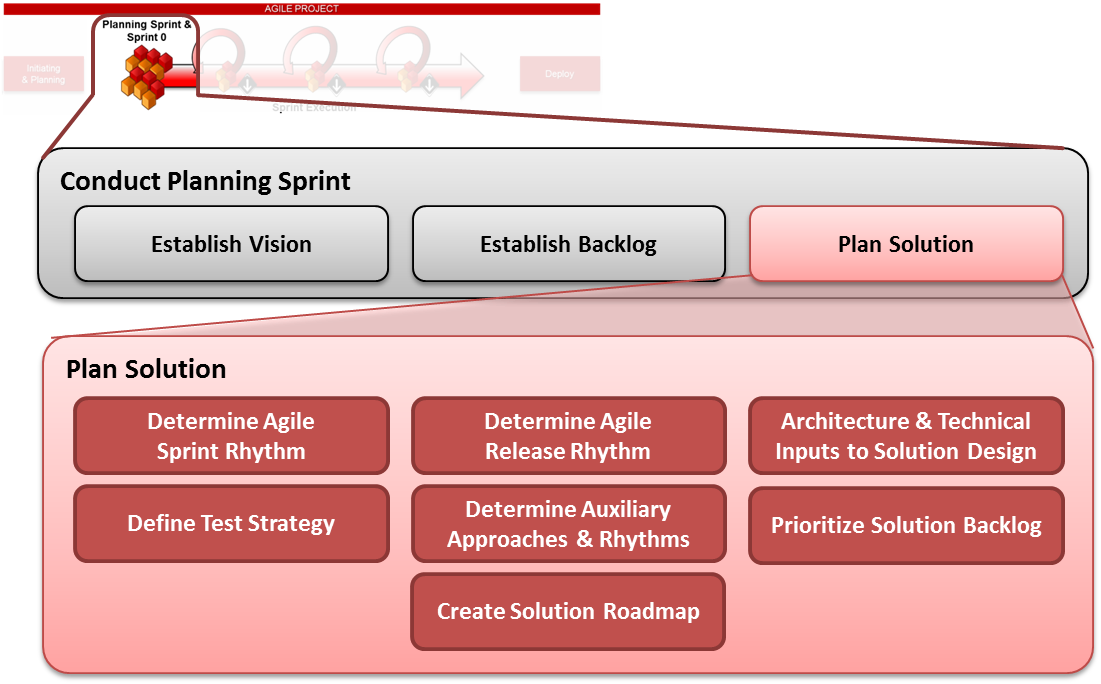
Determine Agile Sprint Rhythm (APS03)
Sub-Steps:
APS03.1 - Determine Business & Demo Schedule
APS03.2 - Determine Agile Ceremony Schedule
APS03.3 - Determine Daily Standup & Delivery Schedule
|
Description |
The team decides the start and end dates for the various 2-week sprints over the course of the project and determines their normal operating rhythm for the various sprint ceremonies (Sprint planning, standup meetings, sprint demos, backlog grooming, retrospectives, etc.) Your sprint schedule should be reflected in your Solution Roadmap (see below) |
|
Who is Involved |
|
|
Mechanism |
|
|
Frequency |
Once per project |
|
Outcomes |
A definite sprint schedule consisting of:
|
|
Guidelines |
|
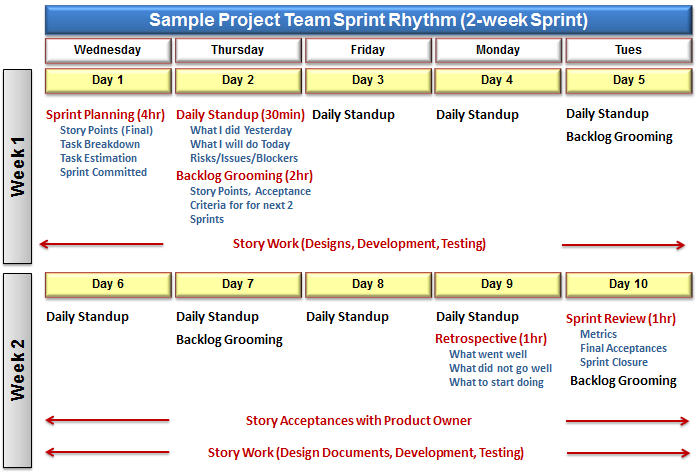
Sprint Schedule/Rhythm Illustration
Your sprint rhythm should outline your general preference for where the Agile ceremonies will fall within your Agile sprints. These include:
-
Sprint planning
-
Daily standup/Scrum meetings
-
Backlog grooming
-
Sprint retrospective
-
Sprint review
-
Sprint demo/Showcase
NOTE: The following is a sample Sprint rhythm used by Agile teams for a 2 week sprint
Determine Release Schedule (APS04)
Sub-Steps:
APS04.1 - Determine Business Demand & Needs
APS04.2 - Determine External Dependencies
APS04.3 - Determine Internal Scope Dependencies
APS04.4 - Set Up Release & Sprints in Agile Tool
|
Description |
The team makes initial plans for how many releases are planned for the project and sets dates aligning to sprint schedules. Normal Agile releases are purposely small (normally 1-4 sprints). When conducting this activity the team should make sure they understand the following:
Your release schedule should be reflected in your Solution Roadmap (see below) |
|
Who is Involved |
|
|
Mechanism |
|
|
Frequency |
Once at the beginning of a project. Adjusted (if necessary) in the course of delivery |
|
Outcomes |
Planned release dates, names/numbers (if desired) |
|
Guidelines |
|
Set Up Release & Sprints in Agile Tool (APS04.4)
|
Description |
Configure the Agile Scrum tool and set up the sprints and releases Set up the project repository for documentation (if different from the Scrum Tool) Understand the handoffs between the Agile tool and the other LAUNCH LEGENDS SDLC tools <<To be refined when Agile Tool is procured. Please stay tuned!>> |
|
Who is Involved |
|
|
Mechanism |
|
|
Frequency |
Once per project. |
|
Outcomes |
The team should have their Agile Scrum project, sprints and releases established in the Agile Scrum tool (at least the first sprint and release, others can be added later) and have a repository and approach ready for documentation (i.e. in the Scrum Tool, a SharePoint, or a Wiki) |
|
Guidelines |
|
Architecture & Technical Inputs to Solution Design (High Level) (APS05)
|
Description |
The team should establish a high-level approach for the technology and architecture of the solution to rapidly enable development environments to be stood up and work to begin, as well as for TRB/ARB/ASB engagement to begin as soon as possible if it was not done already. To facilitate Agile Development, the team should try to establish Continuous Integration/Continuous Build architecture to enable the rapid verification and change needed in the Agile model. This will make testing and story acceptance easier later in the process. For Agile projects, it is understood that the solution design will be maintained using Agile principles of documenting only to the extent which adds value at that point in time. In line with this, Agile teams should complete as much information as is known during their planning sprint, and then update the solution design frequently as the individual user stories, features, and components are designed during the subsequent sprints. For Agile teams, the solution design might also be maintained in a project wiki, and if so please be sure to reference the solution design artifact template, which provides a good structure for your team to follow in its wiki, which will then be standard for LAUNCH LEGENDS. |
|
Who is Involved |
|
|
Mechanism |
|
|
Frequency |
Once at the beginning of a project. Adjusted (if necessary) in the course of delivery and maintained as a living document |
|
Outcomes |
High-level technology and architecture model is defined, documented in the solution design artifact |
|
Guidelines |
|
Define Test Strategy (APS06)
|
Description |
The team should determine when and how the following testing types will be executed in the course of Sprints in accordance with LAUNCH LEGENDS GIT Enterprise Testing Standards. The following types of testing must be considered when preparing the testing strategy, and it is at the discretion of the project team to determine which are mandatory and applicable in their specific circumstances
NOTE: For acceptance testing, depending on whether your business has been formally involved in the testing within your sprints, this acceptance testing might already be covered within your functional testing in the sprints. If this is the case PLEASE BE SURE your business is aware and approves whether their formal acceptance testing will be handled within sprints, or in a separate way (i.e. UAT testing). |
|
Who is Involved |
|
|
Mechanism |
|
|
Frequency |
The testing strategy is prepared once per project at the beginning during the planning sprint, and is adjusted (as needed) through the course of delivery if the sprints, rhythm, or other factors change |
|
Outcomes |
An agreed-upon testing approach which addresses all of the major testing areas and guidelines for testing BOTH within sprints and outside sprints |
|
Guidelines |
|
Agile Testing RACI
|
Activity/Task/Deliverable |
Product Owner |
Project Manager |
Scrum Master |
Scrum Team |
Test Lead (can be sourced from Centralized Testing Team) |
|
Test Strategy Artifact |
I |
A |
I |
R |
C |
|
Test Results (acceptance criteria based testing) |
I |
I |
I |
I |
R/A |
|
End-To-End Test Cases for Release Testing |
I |
I |
I |
I |
R/A |
|
On-boarding document for resources being added during release sprint |
I |
I |
C |
R |
R/A |
|
SIT Test Results |
I |
I |
I |
I |
R/A |
|
Daily Execution Status Reports |
I |
I |
R |
R |
R/A |
|
Performance Test Scripts & results |
I |
I |
I |
I |
R/A |
|
Lessons Learned Document |
I |
A |
R |
R |
R |
Determine Auxiliary Group Approaches & Rhythms (APS07)
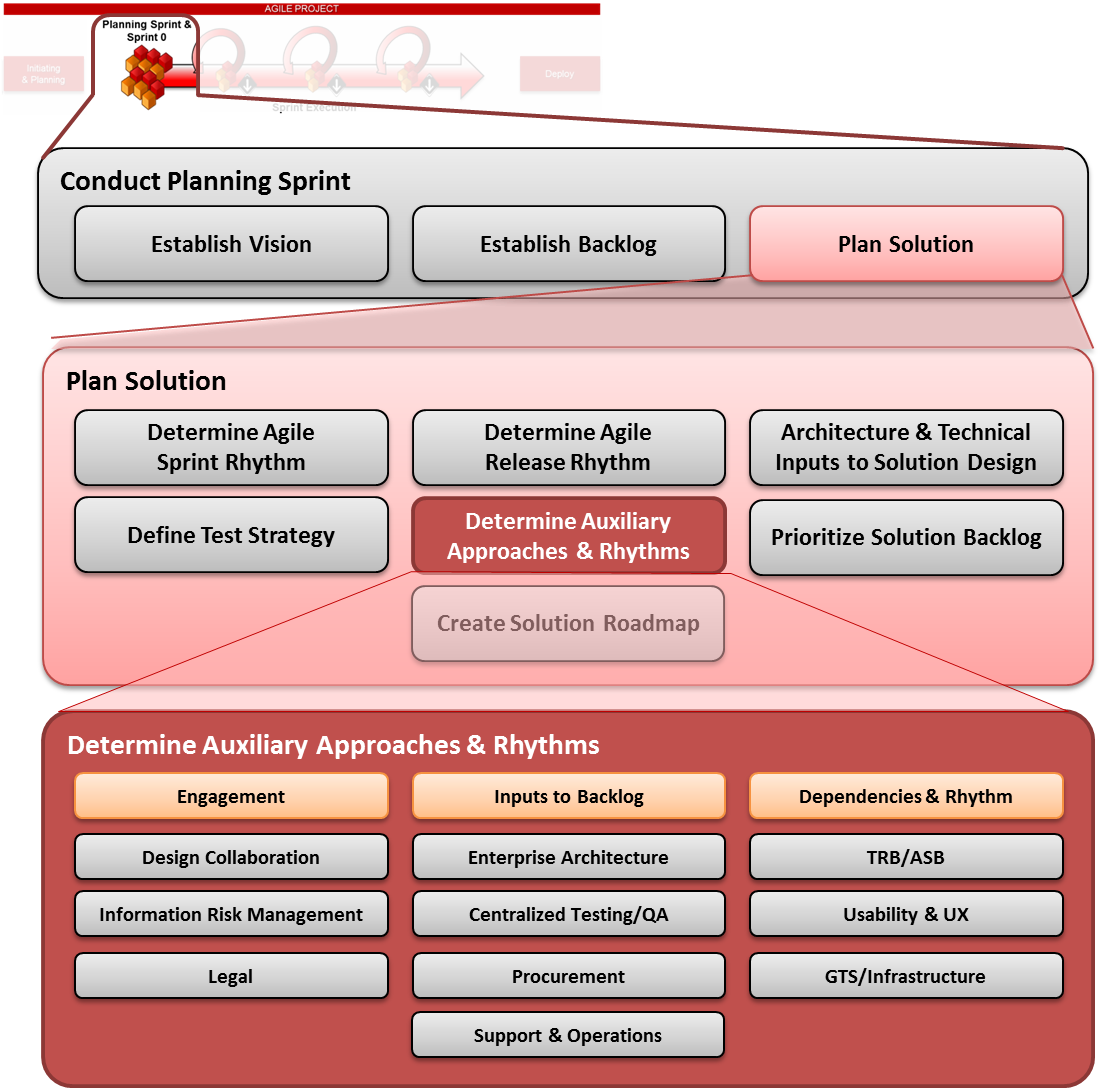
Sub-Steps:
APS07.1 - Confirm Auxiliary Engagement
APS07.2 - Collect Auxiliary Inputs to Backlog & Prioritize
APS07.3 - Collect Auxiliary Inputs to Dependencies & Sprint Rhythm
Auxiliary Engagement
|
Description |
The team should contact any relevant LAUNCH LEGENDS teams and groups that will be needed to help ensure the project is delivered with quality. These groups include security, legal, usability, user experience, centralized testing, Infrastructure, support, operations, or any other relevant groups the team or solution path filter has recommended. Complete guidelines and instructions are included below for the following groups:
|
|
Who is Involved |
|
|
Mechanisms |
|
|
Frequency |
Varies by group (see below) |
|
Outcomes |
|
|
Guidelines |
|
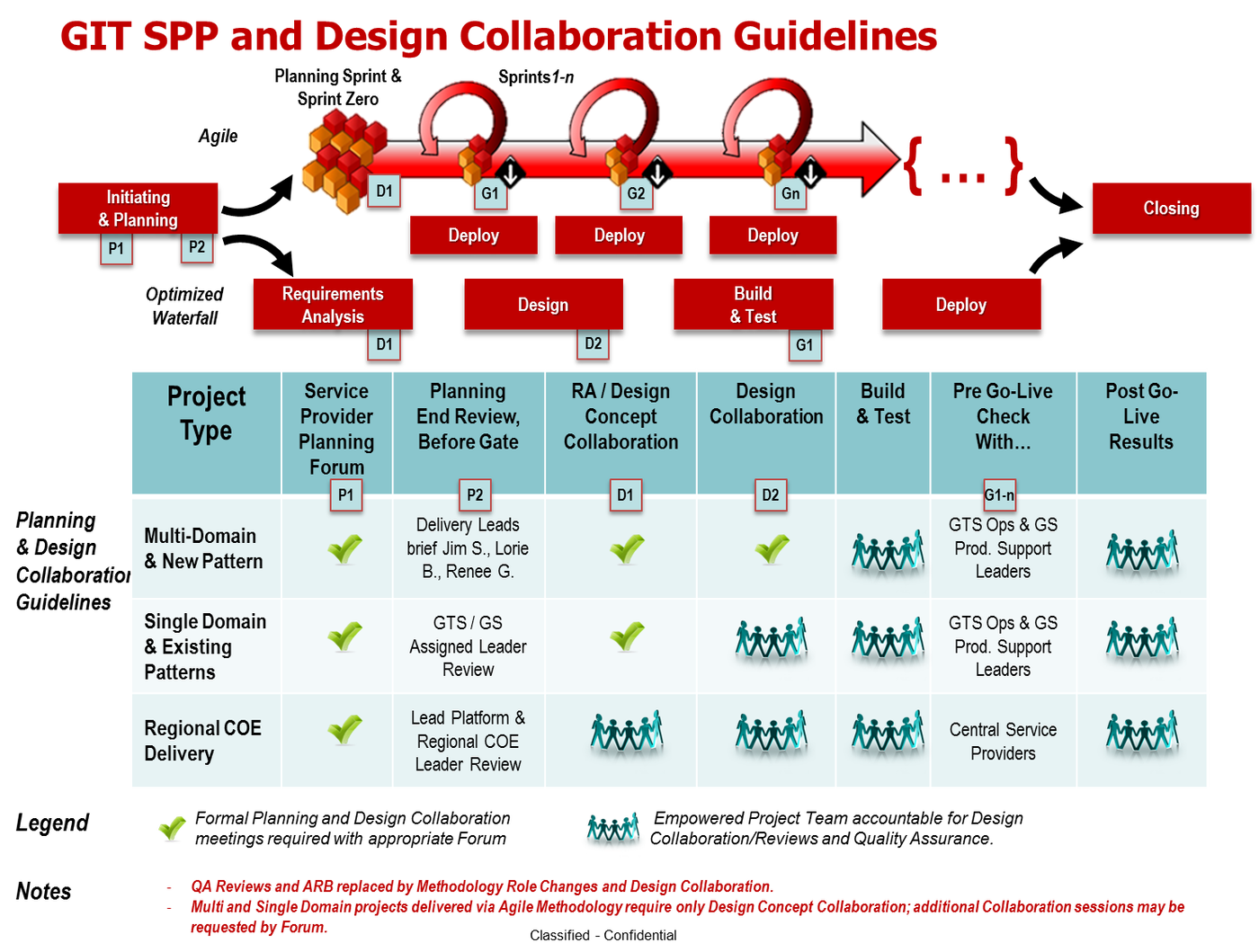
Auxiliary Process Overview – Design Collaboration
GIT Design Collaboration is a follow-up to the Service Provider Planning (SPP) process that occurs during Initiate & Plan (I&P). During that process step, the team is informed of the design collaboration path required for the project. Design collaboration is required for projects classified as Single Domain/Existing Patterns or Multi-Domain/New Patterns in the SPP process. For most of these projects, only the Design Concept Collaboration step (D1 in diagram below) is required. For select projects, the forum may request that the team return for a 2nd Design Collaboration session at a key point in later sprints. Projects following Agile methodology will engage the Design Collaboration process during the planning sprint.
|
Inputs |
Outputs |
|
|
When/Why to Engage
Agile teams should reach out for a Design Concept Collaboration meeting during the planning sprint once they have prepared their initial Solution Design (see above). To determine whether this is required, please check with the Design Collaboration guidelines. If in doubt, reach out to the PMO.
How to Engage
|
Contact Information |
|
|
Initial |
|
|
Ongoing/Recurring |
|
|
Re-engagement |
|
|
Mechanisms |
|
|
Cost and Budget Impacts for Project |
|
Design Collaboration Engagement Activities
|
Activity |
Frequency |
When |
Who |
|
Design Concept Collaboration Meeting |
Once |
Sprint Zero |
Project Team |
|
Ongoing Solution Design Review(s) |
Recurring |
Sprint Execution |
Project Team & potentially Design Collaboration forum members |
|
Design Collaboration Meeting |
As Requested by SPP & Design Collaboration Forum |
Sprint Execution |
Project Team, SPP & Design Collaboration Leaders, Design Collaboration Forum |
|
Pre-Deploy Design Reviews |
Recurring |
Sprint Execution |
Ops & Prod. Support Leaders |
Design Collaboration Engagement RACI
|
Activity/Task/Deliverable |
Product Owner |
Project Manager |
Scrum Master |
Scrum Team |
Design Collaboration Team |
SPP & Design Collaboration Leaders |
|
Design Concept Collaboration Engagement |
R |
R/A |
C |
I |
I |
I |
|
Design Collaboration Scheduling, Facilitation, & Meeting Notes |
I |
I |
I |
I |
I |
R/A |
|
Design Collaboration Forum participation and Feedback |
I |
I |
I |
I |
R/A |
I |
|
Implementation of feedback/ Updated Solution Design |
I |
I |
A |
R |
I |
Auxiliary Process Overview – Enterprise Architecture (EA)
Enterprise Architecture aims primarily to improve the effectiveness or efficiency of the LAUNCH LEGENDS business itself. They develop an "architectural / technology vision": aligned to the vision of the business that represents a "target" or "future state" goal for the various business segments at LAUNCH LEGENDS. Engaging this team ensures that project designs and goals align with the overall enterprise architecture direction
|
Inputs |
Outputs |
|
|
When/Why to Engage
As a general rule, teams should reach out for EA guidance whenever and wherever they are making technical decisions for their projects. Technical experts should be engaged during the Initiate & Plan phase of the project to help establish the technical feasibility, technical analysis, and high-level technical requirements.
If that was not done, the team should reach out to LAUNCH LEGENDS EA representatives as soon as possible to review their potential technical designs and backlog items to ensure compliance with LAUNCH LEGENDS standards, ensure teams are aware of the latest frameworks available as reference designs, architectures, and implementations, and making sure teams are not building something that already exists somewhere in the LAUNCH LEGENDS architecture landscape.
How to Engage
|
Contact Information |
[email, URL] |
|
Initial |
|
|
Ongoing/Recurring |
NOTE: Teams should leverage EA’s reference architectures and reference implementations from the onset of the project to get a “head start” on building a solution that aligns with their vision
|
|
Re-engagement |
|
|
Mechanisms |
|
|
Cost and Budget Impacts for Project |
|
EA Engagement Activities
|
Activity |
Frequency |
When |
Who |
|
Initial Engagement |
Once |
Initiate & Plan |
Project Team |
|
Solution Design Review(s) |
Recurring |
As needed |
EA |
|
“Technical” Solution Backlog Items |
Recurring |
Backlog Grooming |
Project Team |
|
Sprint Demos/Showcases |
Recurring |
Every Sprint** |
Project Team & EA |
EA Engagement RACI
|
Activity/Task/Deliverable |
Product Owner |
Project Manager |
Scrum Master |
Scrum Team |
EA Team |
|
EA Engagement |
C |
R/A |
C |
I |
I |
|
EA/Technical & Non-functional Requirements, Definition of Done, Acceptance Criteria, etc. |
I |
A |
I |
I |
R |
|
EA/Technical/Non-functional Solution Backlog Items (based on above) |
R |
A |
I |
I |
R |
|
Updated Solution Design |
C |
A |
R |
R |
C |
Auxiliary Process Overview – TRB, ARB, ASB
During Initiate & Plan, any projects implementing a new technology should have engaged and gone before the required review boards to make sure the new technology has been appropriately vetted. These are the Technology Review Board (TRB), Architecture Review Board (ARB), and the Architecture Strategy Board (ASB)
|
Inputs |
Outputs |
|
|
When/Why to Engage
TRB/ARB/ASB should be engaged during Initiate & Plan per the recommendation of the solution path filter. This will ensure that the project has time to prepare the materials and follow-up on any action items with enough lead time before development needs to begin. If they were not engaged during Initiate & Plan, they must be engaged during the planning sprint.
How to Engage
|
Contact Information |
|
|
Initial |
|
|
Ongoing/Recurring |
|
|
Re-engagement |
|
|
Mechanisms |
|
|
Cost and Budget Impacts for Project |
|
TRB/ARB/ASB Engagement Activities
|
Activity |
Frequency |
When |
Who |
|
Preparation of TRB/ARB/ASB Materials |
Once |
Initiate & Plan |
Project Team |
|
TRB Meeting |
Once* |
Initiate & Plan* |
Project Team & TRB |
|
ARB Meeting |
Once* |
Initiate & Plan* |
Project Team & ARB |
|
ASB Meeting |
Once* |
Initiate & Plan* |
Project Team & ASB |
*Can occur more than once if during a later Sprint/Release the project plans to implement new technologies not yet reviewed. If so, re-engage review boards immediately
TRB/ARB/ASB Engagement RACI
|
Activity/Task/Deliverable |
Product Owner |
Project Manager |
Scrum Master |
Scrum Team |
TRB/ARB/ ASB |
|
Architecture Change Proposal |
I |
A |
R |
R |
I |
|
Solution Assessment Questionnaire |
I |
A |
R |
R |
I |
|
Supporting Documentation |
I |
A |
R |
R |
I |
|
TRB/ARB/ASB Review Meeting |
I |
A |
I |
I |
R |
|
Action Items/Follow-up activities |
I |
A |
R |
R |
R |
|
Technology Approval |
I |
A |
I |
I |
R |
Auxiliary Process Overview – Security & Information Risk Management (IRM)
All projects must adhere to LAUNCH LEGENDS’s enterprise security standards for information technology. Many of these policies can be found on the [website URL and Breadcrumb trail], and can also be found on the IRM [website URL and Breadcrumb trail]. Engaging Security ensures project compliance.
|
Inputs |
Outputs |
|
|
When/Why to Engage
The solution path filter that the team completes during Initiate & Plan contains the security questionnaire that drives the IRM Risk Assessment which kicks off the security process. As soon as the team has confidence that this section of the solution path filter is complete and accurate, they should send the results to the appropriate IRM contact (i.e. internal, consumer, etc.).
This engagement will allow the security team to determine how heavy their involvement in the project needs to be based on the technical risks. The risk assessment they perform will guide low, medium, or high-touch involvement.
Regardless of whether a project is new custom development, an enhancement of an existing system, or a change to an already-scanned system, any project which plans to make changes or modifications that will be implemented in a production environment should assume that security will need to be involved and engaged. They will determine the appropriate level of support and involvement. In most cases, applications/solutions will need to be re-scanned prior to deployments.
How to Engage
|
Contact Information |
|
|
Initial |
|
|
Ongoing/Recurring |
NOTE: Teams can use IRM’s Secure Coding Standards to get a “head start” on coding securely
|
|
Re-engagement |
|
|
Mechanisms |
|
|
Cost and Budget Impacts for Project |
|
IRM/Security Engagement Activities
|
Activity |
Frequency |
When |
Who |
|
Solution Path Filter/Initiation Questionnaire |
Once |
Initiate & Plan |
Project Team |
|
Security Risk Assessment |
Once* |
Initiate & Plan |
Security |
|
Security Project Playbook |
Once* |
Initiate & Plan |
Security |
|
Security Solution Backlog Items |
Recurring |
Backlog Grooming |
Project Team |
|
Recurring Security Testing |
Recurring |
Every Sprint |
Project Team |
|
Pre-deployment Security Scanning |
Recurring |
Once per Release |
Security |
|
Scan Remediation & Exceptions |
Recurring |
Once per Release |
Project Team |
|
Sprint Demos/Showcases |
Recurring |
Every Sprint** |
Project Team & Security*** |
|
Pre-Release Go/No-Go Checklist |
Per Release |
Release/Deploy Sprint |
Project Team & Security |
*Can occur more than once if answers to the security questionnaire change over the course of development
**Some teams may not do showcases every sprint. At minimum, should be invited to showcases
***Project Team should discuss with security their desired frequency of attendance
IRM/Security Engagement RACI
|
Activity/Task/Deliverable |
Product Owner |
Project Manager |
Scrum Master |
Scrum Team |
IRM |
|
LAUNCH LEGENDS Secure Coding Standards |
I |
I |
I |
I |
R/A |
|
Solution Path Filter/Initiation Questionnaire |
R/A |
R/A |
I |
I |
I |
|
Security Risk Assessment |
C |
C |
C |
I |
R/A |
|
Security Project Playbook |
C |
C |
C |
I |
R/A |
|
Security Requirements, Definition of Done, Acceptance Criteria, etc. |
R |
A |
I |
I |
C |
|
Security Solution Backlog Items (based on above) |
R |
A |
I |
I |
C |
|
Security Approach |
C |
R/A |
C |
I |
C |
|
Recurring Security Testing |
I |
I |
A |
R |
C |
|
Pre-deployment Security Scanning |
I |
I |
I |
C |
R/A |
|
Scan Remediation & Exceptions |
I |
I |
A |
R |
C |
|
Go/No-Go Checklist |
C |
A |
R |
R |
C/I |
Auxiliary Process Overview – Enterprise QA Testing Services (Centralized Testing)
LAUNCH LEGENDS offers QA services on an ongoing basis to interested projects. In Agile, because Product Owners are more involved and get frequent visibility into testing and testing results, this team offers several different options of Agile testing depending on the project’s budget and automation capabilities to support project teams and maintain adherence to LAUNCH LEGENDS Enterprise Testing Standards and the Testing Strategy deliverable.
NOTE: If the team or agency does NOT use enterprise QA testing services, they still must follow LAUNCH LEGENDS Enterprise Testing Standards.
|
Phase |
Inputs |
Outputs |
|
Planning Sprint through Sprint Zero |
|
|
|
Sprint Execution |
|
|
|
Pre-release |
|
|
When/Why to Engage
The enterprise QA group can help teams ensure adherence to LAUNCH LEGENDS Enterprise Testing Standards and provide business acceptance testing on behalf of the Product Owners in cases where the PO is not directly involved in testing, or where a “pre-deploy” UAT is still seen as valuable. Additionally, the Centralized Testing service can provide within-sprint testing to ensure quality of delivered user stories. Depending on the project’s situation and capacity/budget for automated vs. manual testing, there are a few Agile testing models the team can supply, depending on the project makeup, manual vs/automation mix, and other factors
Sample Model 1 – Within-Sprint Testing
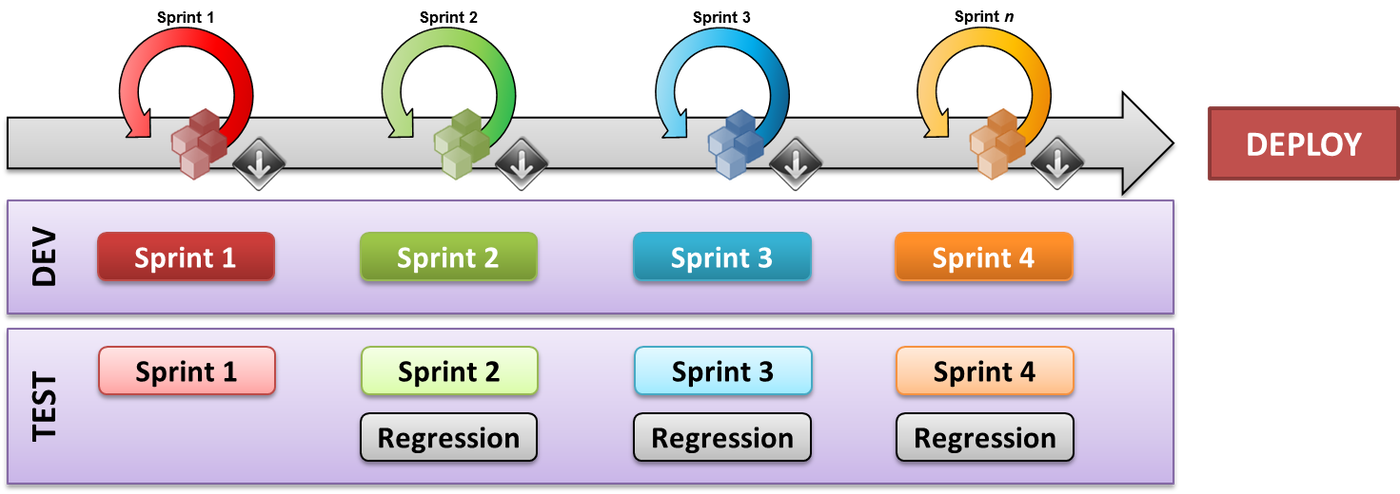
NOTE: Ideal/Preferred in Agile, but requires rapid testing, high manual testing capacity & automated testing investment
Sample Model 2 – Staggered-Sprint Testing
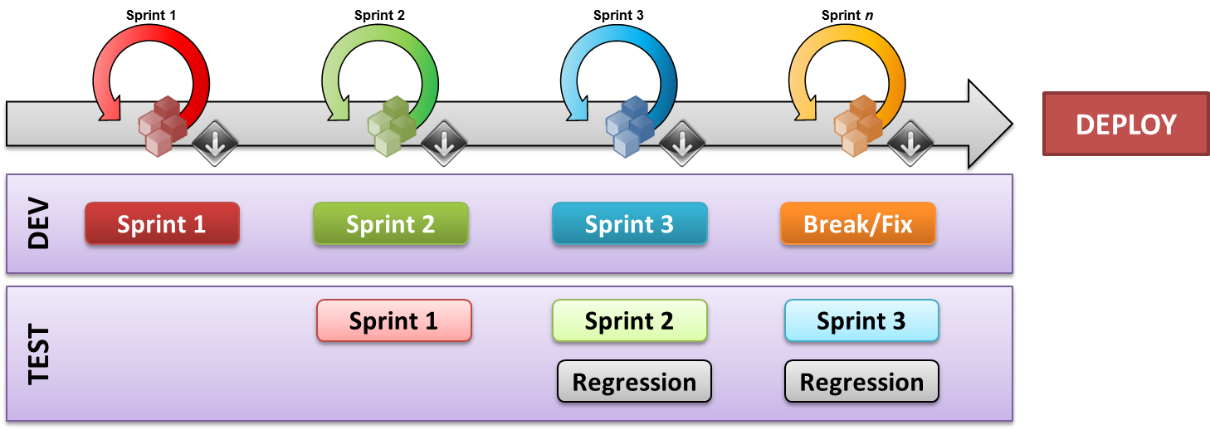
NOTE: Not ideal/preferred in Agile, but useful when a project has minimal automation capabilities, limited manual testing capacity, etc.
How to Engage
|
Contact Information |
|
|
Initial |
|
|
Ongoing/Recurring |
|
|
Re-engagement |
|
|
Mechanisms |
|
|
Cost and Budget Impacts for Project |
|
QA Engagement Activities
|
Activity |
Frequency |
When |
Who |
|
Determine Test Levels to be executed in each sprint (for e.g. component, integration, performance) |
Once |
Planning Sprint & Sprint Zero |
Project Team, Centralized Testing |
|
Determine the tools that will be used for Testing |
Once |
Planning Sprint & Sprint Zero |
Project Team, Centralized Testing |
|
Determine Test Environments |
Once |
Planning Sprint & Sprint Zero |
Project Team, Centralized Testing |
|
Cost Estimation / Level of Efforts |
Once |
Planning Sprint & Sprint Zero |
Centralized Testing |
|
Understand User Stories |
Recurring |
Every Sprint |
Centralized Testing |
|
Participate in daily scrum Meetings |
Recurring |
Every Sprint |
Project Team, Centralized Testing |
|
Review Acceptance Criteria for each user stories and update if required |
Recurring |
Every Sprint |
Centralized Testing |
|
Executing various levels of test based on Acceptance criteria |
Recurring |
Every Sprint |
Centralized Testing |
|
Detailed End-To-End Test Case Creation for Release Testing |
Recurring |
Every Sprint |
Centralized Testing |
|
Provide Demo to product owner |
Recurring |
Every Sprint |
Centralized Testing |
|
End-To-End Functional Testing /SIT |
Per Release |
Release/Deploy Sprint |
Centralized Testing |
|
Daily Defect Calls with Vendor and Company |
Per Release |
Release/Deploy Sprint |
Centralized Testing |
|
Performance Test Planning (Scope, Approach & Environment considerations) |
Per Release |
Release/Deploy Sprint |
Centralized Testing |
|
Performance Test Script Creation and Execution |
Per Release |
Release/Deploy Sprint |
Centralized Testing |
Agile Testing RACI
|
Activity/Task/Deliverable |
Product Owner |
Project Manager |
Scrum Master |
Scrum Team |
Test Lead (can be sourced from Centralized Testing Team) |
|
Test Strategy Artifact |
I |
A |
I |
R |
C |
|
Centralized Testing Services Agreement |
R |
A |
I |
I |
R |
|
Test Results (acceptance criteria based testing) |
I |
I |
I |
I |
R/A |
|
End-To-End Test Cases for Release Testing |
I |
I |
I |
I |
R/A |
|
On-boarding document for resources being added during release sprint |
I |
I |
C |
R |
R/A |
|
SIT Test Results |
I |
I |
I |
I |
R/A |
|
Daily Execution Status Reports |
I |
I |
R |
R |
R/A |
|
Performance Test Scripts & results |
I |
I |
I |
I |
R/A |
|
Lessons Learned Document |
I |
A |
R |
R |
R |
Auxiliary Process Overview – User Experience and Usability
The purpose of Usability and User Experience (UX) engagement is to ensure that the solution you are designing actually allows users to do the tasks they need to do in an effective way, and to use technologies and design components that enable them to do this.
It is important to note that there are varying conceptions of what “User Experience” refers to. Some people may use this term to refer simply to designs/creative items, some to refer to specific technical implementations, and many others. To make sure your project is building with your users in mind (which is a tenet of Agile), it is important to understand that usability includes the following concepts:
-
User Experience
-
Usability
-
Visual Design (i.e. “Look & Feel”)
This includes analyzing and measuring things like:
-
Efficiency: How long does it take?
-
Effectiveness: Can they actually do what they need to do?
-
Satisfaction: Are they comfortable and able to continuously do it?
-
Ease of Learning: Can they pick it up quickly?
|
Inputs |
Outputs |
|
|
When/Why to Engage
UX/Usability engagement is particularly important and useful in the consumer space, where getting our users to engage and keep using our solutions is paramount. In the internal space, it is important to drive consistency and interactions across the LAUNCH LEGENDS tool space. Engagement can occur at various levels:
-
Advisory
-
Agency Evaluation
-
Embedded Consultancy (within team/sprints)
-
Partnership with Procurement during vendor selection to establish/vet agency expertise
In most cases, UX should be engaged immediately after the ‘actors’ or user types have been identified, which can occur at the end of Initiate & Plan or at the beginning of the Agile planning sprint. Usability, user experience, and designs will all be driven based on what type of resource is using the application.
User Experience provides the following services at various levels of engagement. Check with the recommendations in the solution path filter to figure out which of these will be appropriate for your project given the recommendation and the budget:
-
Custom UI Design
-
Evaluations (Usability, User Experience, Design)
-
Mobile Design
-
Responsive Design
-
UI Pattern Design
-
User Research
-
Prototyping
How to Engage
|
Contact Information |
|
|
Initial |
|
|
Ongoing/Recurring |
|
|
Re-engagement |
|
|
Mechanisms |
|
|
Cost and Budget Impacts for Project |
|
UX/Usability Engagement Activities
|
Activity |
Frequency |
When |
Who |
|
Initial Engagement |
Once |
Initiate & Plan |
Project Team |
|
Legal Solution Backlog Items |
Recurring |
Backlog Grooming |
Project Team |
|
Sprint Demos/Showcases |
Recurring |
Every Sprint |
Project Team |
|
Usability Testing |
As Needed |
Sprint Execution |
Usability/UX Team |
Usability/UX Engagement RACI
|
Activity/Task/Deliverable |
Product Owner |
Project Manager |
Scrum Master |
Scrum Team |
Usability/ UX Team |
|
UX/Usability Engagement |
C |
R/A |
C |
I |
I |
|
UX/Usability Requirements, Definition of Done, Acceptance Criteria, etc. |
I |
A |
I |
I |
R |
|
UX/Usability Solution Backlog Items (based on above) |
R |
A |
I |
I |
R |
|
UX/Usability Approach |
C |
R/A |
C |
I |
C |
Auxiliary Process Overview – Legal
In any case where LAUNCH LEGENDS will be putting something in front of consumers, especially in cases where the materials will be subject to significant external regulatory oversight, make any sort of “promises” to external parties (such as advertising or rewards), or that could potentially have an impact on the overall perception of the LAUNCH LEGENDS brands in the marketplace, it is important to speak with LAUNCH LEGENDS legal group representatives.
NOTE: The level of legal involvement needed will vary by project and team (global, local, multi-market, etc.). The legal approach will capture and guide the rhythm the particular project and team will follow.
|
Inputs |
Outputs |
|
|
When/Why to Engage
Most commonly, the legal group likes to be aware of any applications which would contain items/features/impacts including (but not limited to) the items listed below. Legal involvement is most common in consumer-facing projects and not as frequently for internal projects, though there are cases where a legal review might apply, especially if any of the below criteria are met. IF IT IS UNCLEAR WHETHER OR NOT TO ENGAGE THE LEGAL TEAM, the best practice is to check with Legal anyway before you assume the answer is no.
-
Launch Legends Market-facing Digital Presence or Assets (such as reviews of designs, branding, wireframes, copy)
-
User Privacy
-
Guidelines
-
Disclosures
-
User Opt-ins/Opt-outs
-
Digital Rights Management (such as photo submission, etc.)
How to Engage
|
Initial |
|
|
Ongoing/Recurring |
|
|
Re-engagement |
|
|
Mechanisms |
|
|
Cost and Budget Impacts for Project |
|
Legal Engagement Activities
|
Activity |
Frequency |
When |
Who |
|
Initial Engagement |
Once |
Initiate & Plan |
Project Team |
|
Legal Solution Backlog Items |
Recurring |
Backlog Grooming |
Project Team |
|
Sprint Demos/Showcases |
Recurring |
Every Sprint** |
Project Team |
Legal Engagement RACI
|
Activity/Task/Deliverable |
Product Owner |
Project Manager |
Scrum Master |
Scrum Team |
Legal Team |
|
Legal Engagement |
C |
R/A |
C |
I |
I |
|
Legal Requirements, Definition of Done, Acceptance Criteria, etc. |
R |
A |
I |
I |
C |
|
Legal Solution Backlog Items (based on above) |
R |
A |
I |
I |
C |
|
Legal Approach |
C |
R/A |
C |
I |
C |
Auxiliary Process Overview – Procurement
The Procurement group at LAUNCH LEGENDS exists to serve the needs of the business while using the company’s purchasing power and providing reasonable controls so that the company obtains the maximum value for the goods and services purchased.
Procurement seeks to ensure that each employee understands how to identify company-approved suppliers, when to use supply agreements, the approved methods for purchasing goods and services and his/her responsibilities and the limits of his/her authority.
Each employee who requisitions, purchases, or approves purchasing transactions is accountable for the business purpose and propriety of the transaction.
Procurement, Purchasing & Payables Policy (SPP5.1)
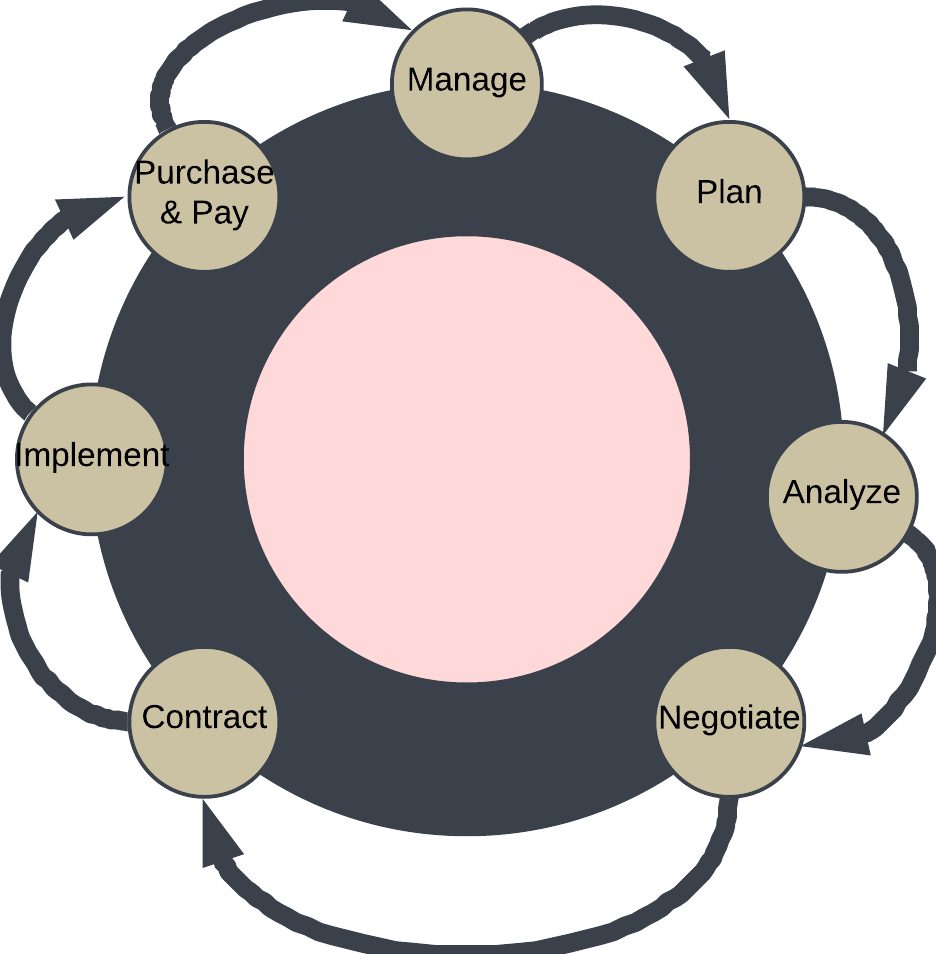
|
Inputs |
Outputs |
|
|
When/Why to Engage
When needed, Procurement should be engaged as early as possible within a project to ensure the necessary time needed for their activities is accounted for. In almost all cases, this should occur during Initiate & Plan, and in conjunction with taking new requests through the TRB or ASB (see below for more details on those processes.
This is essential for Agile teams in particular as it will be difficult for a team to set up their sprint rhythm if there are delays in obtaining the approvals and technologies they need to deliver. If for some reason an Agile team has not been able to engage Procurement until the planning sprint, the team should do so as soon as possible to maximize available time.
If an Agile project requires procurement, it is encouraged that the Agile activities wait until the procurement process has completed to launch, or at minimum that the planning sprint and Sprint 0 be extended until the procurement process has completed. Without the necessary tools/services available, it will be prohibitive for a team to try to start sprint execution.
How to Engage
|
Contact Information |
Hardware & Software
IT Services, Consultants and Contractors
|
|
Initial |
|
|
Ongoing/Recurring |
|
|
Re-engagement |
|
|
Mechanisms |
|
|
Cost and Budget Impacts for Project |
|
Procurement Engagement Activities
|
Activity |
Frequency |
When |
Who |
|
Initial Engagement Contact |
As needed |
Initiate & Plan |
Project Team |
Procurement Engagement RACI
|
Activity/Task/Deliverable |
Product Owner |
Project Manager |
Scrum Master |
Scrum Team |
Procurement Team |
|
Initial Engagement |
R |
R |
I |
I |
C |
Auxiliary Process Overview –Infrastructure engagement
The Infrastructure team is responsible for providing project teams with LAUNCH LEGENDS technical infrastructure upon which to deploy their solutions.
Options include:
-
Internal LAUNCH LEGENDS data center hosting
-
Public cloud hosting
-
Private cloud hosting
|
Inputs |
Outputs |
|
|
When/Why to Engage
The team will initially be engaged during service provider planning during the Initiate & Planning phase of a project. During that meeting, the group will review the project’s solution path filter and determine the level of involvement needed from an Infrastructure perspective. If a team seeks to implement Agile methodology, or their solution path filter recommends adoption of Agile methodology, they should note this during their service provider planning meeting to ensure maximum available time to react to the request.
Following this initial process and recommendation from service provider planning and depending on project need, an Infrastructure Project Manager may be assigned to the team. This person will be responsible for making sure the delivery in the infrastructure space is planned and aligned with the work the project team is doing on the development side. This will be important during the project team’s planning sprint and Sprint 0, to make sure that:
-
The infrastructure team plans to deliver needed infrastructure before a team’s planned Sprint 1 start.
-
To align the project team’s expectations of lead time for infrastructure delivery.
Following this initial engagement, the Infrastructure team resources assigned to the project will work hand-in-hand with the core project team and Scrum Master to plan their activities together. Depending on availability for the specific project or resource, the shared activities might range from all Scrum ceremonies (daily), to potentially just major ceremonies (Sprint Planning Meeting, Demos, Retrospectives, etc.)
Additionally, infrastructure dependencies should be mapped to the solution roadmap and sprints should be planned with infrastructure dependencies in mind.
Standard Infrastructure models are project and platform specific, and include:
-
DEV Environment
-
TEST Environment
-
PROD Environment
Depending on project needs, other environments are available on request. Such as:
-
QA
-
Pre-Prod
-
Maintenance
-
Etc.
By November, we will have the ability for automated provisioning of private (LAUNCH LEGENDS hardware) or cloud (Amazon, Savvis, etc.) infrastructure via the internal private cloud initiative. Agile teams should seek to use this option when possible to ensure fastest turn-around times. Reach out to the Infrastructure team with any questions regarding this.
How to Engage
|
Contact Information |
|
|
Initial |
|
|
Ongoing/Recurring |
|
|
Re-engagement |
|
|
Mechanisms |
|
|
Cost and Budget Impacts for Project |
|
Infrastructure Engagement Activities
|
Activity |
Frequency |
When |
Who |
|
/Infrastructure Engagement |
Once |
Initiate & Plan |
Project Team |
|
Resource Assignment |
Once |
I&P Service Provider Planning |
Project Team & /Infrastructure Team |
|
Preliminary Solution Design/Infrastructure needs |
Once |
Planning Sprint |
Project Team |
|
Infrastructure Input to Solution Backlog (shared, or coordinated dependencies) |
As Needed |
Planning Sprint, Sprint Zero, Sprint Execution |
/Infrastructure Team |
|
Infrastructure Input to Solution Design |
As Needed |
Planning Sprint, Sprint Zero, Sprint Execution |
/Infrastructure Team |
|
Infrastructure Input to Solution Roadmap (shared, or coordinated dependencies) |
As Needed |
Planning Sprint, Sprint Zero, Sprint Execution |
/Infrastructure Team |
|
Delivery of Infrastructure components and/or user stories |
As Needed |
Sprint Zero, Sprint Execution |
/Infrastructure Team |
|
Phase-based Approvals |
As Needed (determined in SPP) |
Planning Sprint, Sprint Zero, Sprint Execution |
/Infrastructure Team |
Infrastructure Engagement RACI
|
Activity/Task/Deliverable |
Product Owner |
Project Manager |
Scrum Master |
Scrum Team |
/ Infra Team |
|
/Infrastructure Engagement |
I |
R/A |
I |
I |
C |
|
Service Provider Planning |
C |
R/A |
I |
I |
R |
|
Resource Assignment |
I |
I |
I |
I |
R/A |
|
Solution Design (Preliminary) |
C |
A |
C |
R |
C |
|
Infrastructure updates to Solution Design |
I |
A |
I |
R |
R |
|
Infrastructure User Stories |
R/A |
I |
I |
I |
R |
|
Infrastructure roadmap/inputs to Solution Roadmap |
I |
A |
C |
I |
R/A |
|
Infrastructure Delivery |
I |
A |
I |
R |
R/A |
|
Infrastructure Phase-based Approvals |
I |
A |
I |
I |
R |