Managing Change in Agile
Managing Change in Agile

One of the key Agile principles is to welcome change – changing scope, changing requirements, changing business direction. In Agile projects, changes in requirements are expected and accommodated through Backlog Grooming over the course of Sprint Execution & delivery. However, those changes usually will not materially impact overall project cost or Schedule. Agile teams need to follow special guidelines for change Management.
The way Change Management is operationalized in Agile depends on whether the change is needed BEFORE a piece of work begins, DURING a Sprint that the work is committed to being worked, or AFTER the piece of work has been completed in a Sprint. In addition, it also depends whether the change has a MATERIAL IMPACT on Schedule or Cost.
Change Management Before or After a Story is Worked
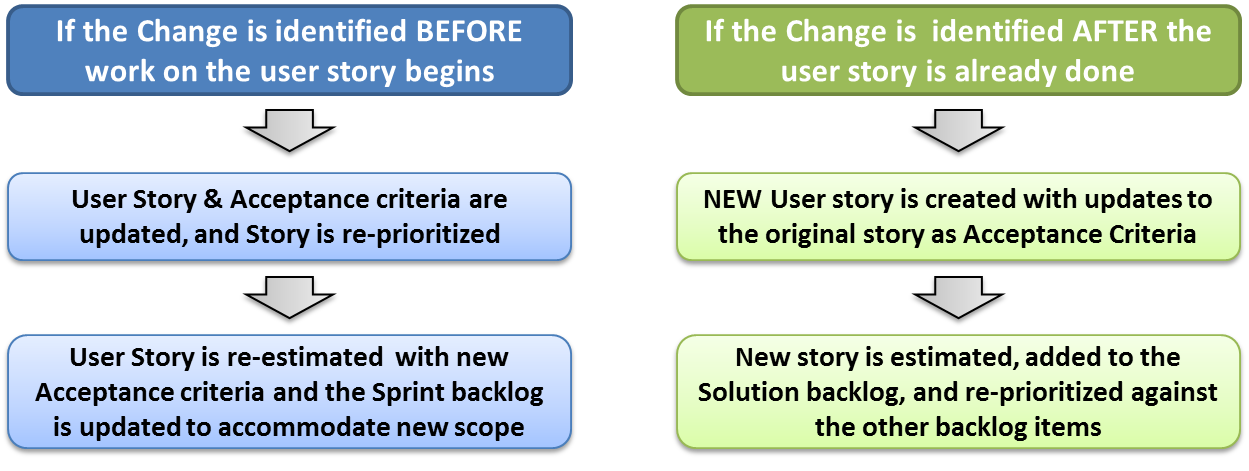
The Agile framework allows us to easily address changes before and after a Sprint through the Backlog Grooming, Sprint Planning, and prioritization activities. This can be illustrated as follows:
Change Management While a Story is Worked
If a change to a user story is identified while work on that story is already in progress DURING a Sprint, the handling of a change requires a bit more coordination. This should be a RARE occasion, and only when necessary to avoid serious business risk or cost, or enable urgent opportunities (i.e. address a newly-identified security vulnerability, respond to an RFP, etc. before the Sprint ends). This can be illustrated as follows:

Canceling a Sprint if Direction Change is Needed
In rare cases, a change may be so urgent & impactful that the effort will consume a large amount of the Sprint’s capacity AND action must be taken immediately to accommodate the change or the business will suffer some sort of loss or risk (for example, a critical production change, an immediate market demand, etc.).
In these special circumstances, the Product Owner and the Team may elect to Cancel a Sprint in order to begin work immediately on the change or on new work. If a Sprint is cancelled, this means:
-
All work on in-progress tasks or user stories is stopped
-
The Sprint is closed (if none of the old work is needed anymore), OR
-
The necessary items are moved back into the solution backlog for later re-prioritization if they are still not started or in-progress
-
The Team does not need to meet its remaining metrics for the Sprint (since it was decided on purpose to interrupt the Sprint)
-
Another round of Sprint Planning should begin immediately to address re-prioritization
Formal Change Requests for Material Changes
As requirements and business needs change, in an Agile project the addition of large amounts of NEW scope in the backlog may cause the project’s projected completion timeline or budget to grow beyond what is acceptable per the terms of a contract or business needs.
In these cases, the Agile team should conduct formal Change Management to alter the agreed-upon scope, schedule, or budget for the delivery work when it will exceed what has been agreed upon contractually.
This should be considered in situations like the following:
-
Contract has fixed-scope, and scope changes materially at the Epic or feature level
(NOTE: Fixed-Scope contracts are difficult to manage in Agile because of the constant change in requirements and priority of features To prevent an over-abundance of scope change requests, consider adding variable-scope language to your contract (i.e. “potential scope is X, scope changes will be agreed to by Product Owner during backlog grooming)
-
Contract has fixed budget/fees, and scope changes will result in 1 or more additional Sprints of effort and budget to deliver
-
Contract has fixed schedule/timeline, and scope changes will result in 1 or more additional Sprints to deliver beyond the agreed upon end date
When considering a formal Change Request for a material/contractual change in an Agile project, the following are the options to consider (per the Triple Constraint of Scope, Schedule, and Budget):
-
Change Request to cut scope/features
-
Change Request to add scope/features
-
Change Request to add budget/sprints
-
Change Request to add time/sprints
Change Request with a combination of the above